
Users
The macro is designed to work with users created in the "Users" section in the administrative panel.
- Get users by id's
macro_getUsers(params)"params" is an object that can contain the following keys:
- ids (required) - id's of users in users tree (array of numbers)
- groups - text id's of groups, information about which, must be selected (array of strings)
- props - text id's of fileds, information about which, must be selected if value doesn't empty (array of strings)
- Create user
macro_createUser(params)"params" is an object that can contain the following keys:
- login(required) - login of user (string)
- password(required) - password of user (string)
- passwordConfirm(required) - password of user (string)
- fields - object where keys are the names of the "users"template fields
Example:
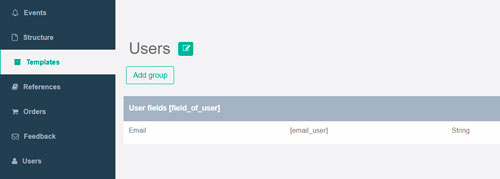
fields = { email_user: 'test@gmail.com' }
- Edit user
macro_editUser(params)"params" is same object as for
macro_createUser(params) - Remove user
macro_removeUser(userId: integer) - Auth user
macro_authUser(params)"params" is an object that can contain the following keys:
- login(required) - login of user (string)
- password(required) - password of user (string)
- rememberMe - saves user to cookie (0 or 1).
- Sing out user
macro_logOutUser() - Restore user. Sends an email to the user with password recovery information. Path to restore email template - "/client/email/users/restore_path/pug/index.pug"
macro_restoreUser(params)"params" is an object that can contain the following keys:
- email(required) - email of user(string)
- Password user recovery. Set new password to user.
macro_passwordUserRecovery(params)"params" is an object that can contain the following keys:
- userHash(required) - hash from email after "macro_restoreUser(params)" (string)
- password(required) - new password of user (string)
- passwordConfirm(required) - confirm new password of user (string)